

In 2026, Retrieval-Augmented Generation (RAG) has moved from experimental prototypes to critical enterprise infrastructure. The question for CTOs and AI engineers isn’t “How do I make this work?” anymore. It’s “How do I make this scale without bankrupting us?”
When you move from a laptop prototype to production, vector database failure modes shift dramatically. Day 0 concerns, like ease of installatio,n give way to Day 2 realities. High P99 latency under concurrency. The operational nightmare of reindexing a billion vectors. Cloud costs that balloon from idle provisioned capacity.
Options are flooding the market, but most comparisons miss what modern RAG workloads actually need: handling high-dimensional vectors, executing complex metadata filtering, and sustaining query throughput without degradation.
This guide evaluates the top six vector databases in 2026. We look beyond marketing claims to analyze how these tools perform in real-world production scenarios. Whether you’re building a semantic search engine, a recommendation system, or an autonomous agent, this analysis will help you choose infrastructure that balances performance, cost, and operational sanity.
TL;DR
Benchmarked 6 vector DB options for production RAG (2026) using 10M vectors (1536–3072d) with stress on filtered search, hybrid search, ingestion vs query tradeoffs, and P99 latency under concurrency.
Best choice depends on workload stage: pgvector for MVPs (<5–10M vectors), Pinecone for production RAG with serverless scaling and low ops, Milvus/Weaviate for on-prem/air-gapped, Qdrant for complex filtering/edge, Elasticsearch for keyword-first legacy stacks.
Key production gotchas: hybrid search must be native/tunable, pre-filtering (single-stage filtering) prevents latency blowups at low selectivity, and “open source” often costs more in HA replication + idle capacity + DevOps.
How we benchmarked vector databases for production RAG
Most vendor benchmarks rely on generic datasets that don’t reflect the complexity of 2026 RAG architectures. We wanted something more useful, so we built an evaluation method that mimics actual production stress.
Dataset and Dimensions We used a realistic dataset with over 10 million vectors from modern embedding models (1536d to 3072d dimensions), similar to what you’d get from OpenAI’s latest models or Cohere’s embedding endpoints. These dimensions create a memory and storage footprint that matches real enterprise applications, not the smaller, lower-dimensional datasets you see in academic benchmarks.
The “Hard” Tests Standard approximate nearest neighbor (ANN) search is table stakes. We focused on where generic databases actually break:
Filtered Search: We measured latency when applying restrictive metadata filters (searching only within a specific user_id or document_group).
Hybrid Search: We evaluated performance and tunability when combining sparse vectors (keyword search) with dense vectors (semantic search).
Ingestion vs. Query: We measured “Time-to-RAG” (how fast data becomes indexed and searchable) against Query Latency (P99), acknowledging the tradeoff between write throughput and read performance.
Infrastructure Parity For a fair Total Cost of Ownership (TCO) comparison, we modeled managed cloud service costs against the equivalent raw compute for self-hosted solutions. This includes the cost of replication for high availability (usually 3x nodes) and the operational overhead of managing stateful infrastructure.
All benchmark configurations, dataset preparation scripts, and testing methodologies are documented so you can validate these findings against your specific workload.
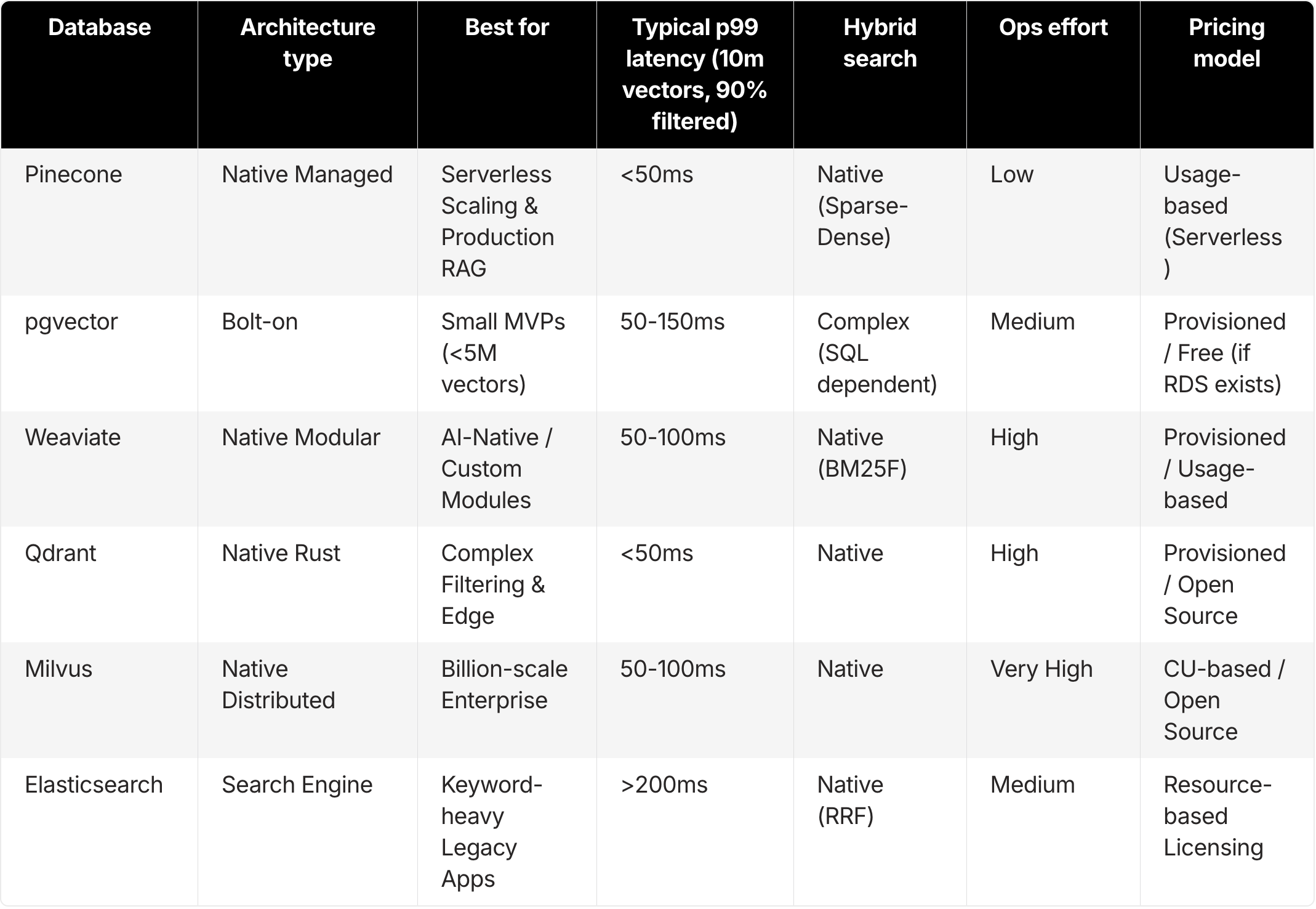
Vector database comparison for production RAG (2026 decision matrix)
For engineering leaders who need to make fast, data-backed architectural decisions, this matrix categorizes the top tools by their architectural strengths and best-fit use cases.
Pinecone: Serverless vector database for production RAG
Best for
Teams requiring serverless scalability that decouples cost from capacity.
High-throughput RAG applications that demand guaranteed low latency without infrastructure management.
Developers who need “instant freshness” where data is queryable seconds after ingestion.
Overview
Pinecone created the managed vector database category and, in 2026, continues to define it through its Serverless architecture. Unlike traditional databases that require you to provision pods or shards based on peak load estimates, Pinecone Serverless decouples storage from compute.
This solves the “provisioning guessing game.” Applications can scale down to zero cost when idle and scale up instantly during traffic spikes.
Key features
Serverless Architecture: The system separates the storage layer (blob object storage) from the compute layer. You pay only for gigabytes stored and actual read/write units consumed.
Pinecone Inference: An integrated feature that handles reranking and embedding generation within the database pipeline, reducing the network latency you’d normally see with external API calls.
Hybrid Search: Native support for sparse-dense hybrid search (combining BM25/SPLADE with dense vectors). Essential for retrieving exact matches like part numbers or names.
Namespaces: Native multi-tenancy that lets you isolate user data logically within a single index without performance degradation.
Metadata Filtering: Uses “single-stage” filtering that applies metadata constraints during graph traversal, not as a slow post-processing step.
Pros
Zero Ops: No versions to upgrade, no shards to rebalance, no nodes to provision. The service handles all infrastructure complexity.
Cost at Scale: The serverless model significantly undercuts provisioned instances for variable workloads. You stop paying for idle server time, which is honestly the primary cost driver for RAG apps that aren’t running 24/7.
Instant Freshness: Vectors become available for query upon ingestion. Critical for real-time RAG agents that need to recall data added moments ago.
Cons
Cloud Only: Pinecone is a fully managed service. It won’t work for air-gapped or on-premise environments, though it’s available via AWS Marketplace and supports VPC peering for security.
Black Box: Because Pinecone is fully managed, you have less visibility into low-level index parameters (like HNSW ef_construction) compared to self-hosted tools.
Pricing
Serverless: Usage-based pricing model (Storage per GB + Read/Write Units).
Pod-based: Legacy provisioned throughput remains available for specific steady-state, high-throughput workloads.
Free Tier: A generous starter tier allows prototyping and small production apps at no cost.
pgvector (PostgreSQL): Vector search for small to mid-scale RAG
Best for
Early-stage startups and internal tools already running on PostgreSQL.
Applications with small to medium datasets (under 5 million to 10 million vectors) where minimizing tech stack surface area is the priority.
Overview
pgvector is an open-source extension for PostgreSQL that adds vector similarity search to standard SQL queries. You can store embeddings alongside transactional data and run unified queries that join vector search results with relational tables.
Key features
ACID Compliance: pgvector inherits the robustness, reliability, and transaction safety of PostgreSQL.
SQL Integration: Perform vector searches and join results with other table data in a single SQL query, simplifying application logic.
HNSW & IVFFlat: pgvector supports standard indexing algorithms, with HNSW being the default for performance.
Pros
Simplicity: If you already use Postgres (via RDS, Supabase, Neon, or Aurora), you’ve got no new infrastructure to procure or secure.
Cost: For small workloads, pgvector is free if your existing database instance has spare CPU and RAM capacity.
Unified Backups: Your vector data gets backed up and restored alongside your relational data, simplifying disaster recovery.
Cons
Performance Wall: While version 0.8.0 introduced features like iterative_scan to improve recall and speed, pgvector still hits a wall as datasets scale beyond 10 million high-dimensional vectors.
Resource Contention: Vector search demands intensive compute and memory. Running heavy vector queries on the same instance as your transactional application can starve the CPU, slowing down core business logic (like checkout flows).
Limited Hybrid: Postgres has full-text search (TSVECTOR), but it’s not as finely tuned for semantic ranking or sparse-dense fusion as dedicated vector engines.
Pricing
Open Source: Free if self-hosted.
Managed: Included in the cost of managed Postgres providers (AWS RDS, Google Cloud SQL, Supabase).
Weaviate: Modular vector database for AI-native RAG
Best for
Teams that want a modular, “AI-native” database with deep customization.
Developers who prefer interacting via GraphQL APIs and want the database to handle vectorization.
Overview
Weaviate is an open-source, AI-native vector database with a modular architecture. It integrates with various model providers at the database level, letting it handle the "vectorization" of data (converting text/images to embeddings) automatically during ingestion.
Key features
Modular Ecosystem: “Modules” let you plug in different vectorizers (text2vec-openai, img2vec) directly, automating the embedding process.
GraphQL Interface: Weaviate uses GraphQL for its API, allowing complex data traversing and precise data retrieval in a single request.
Hybrid Search: Native hybrid search capabilities that combine BM25 lexical search with vector search using rank fusion.
Pros
Flexibility: Weaviate can be deployed anywhere. Self-hosted on Docker/Kubernetes or used via Weaviate Cloud.
Rich Object Storage: Weaviate handles data objects alongside vectors effectively, functioning well as a document store.
Cons
Operational Complexity: Self-hosting Weaviate for high availability requires a Kubernetes cluster with at least three nodes and careful configuration. The Total Cost of Ownership (TCO) in DevOps hours adds up fast.
Memory Usage: HNSW indexes in Weaviate can have a high memory footprint compared to optimized managed services, requiring significant RAM for large datasets.
Risky Re-indexing: In many scenarios, changing the schema or index configuration requires re-importing data. That’s operationally risky for live production systems.
Pricing
Open Source: Free (self-hosted).
Serverless Cloud: Usage-based pricing model.
Enterprise Hybrid: Custom pricing for virtual private cloud (VPC) and on-premise support.
Qdrant: High-performance vector database for filtering-heavy RAG
Best for
Performance-obsessed engineering teams comfortable with Rust.
Use cases that require advanced filtering logic or run in resource-constrained environments (Edge).
Overview
Qdrant is a vector database written in Rust, known for its raw performance and efficient resource usage. It features a custom HNSW implementation specifically optimized for filtered search, making it a strong contender for complex retrieval scenarios.
Key features
Filterable HNSW: The Qdrant index handles heavy metadata pre-filtering without the massive performance penalty seen in other systems.
Binary Quantization (BQ): Qdrant supports BQ, which compresses vectors significantly (up to 32x), reducing memory requirements while maintaining acceptable accuracy for many use cases.
Distributed Mode: Native sharding and replication support, allowing horizontal scaling.
Pros
Speed & Efficiency: The Rust codebase delivers excellent performance and memory management, often running on smaller hardware footprints than Java-based alternatives.
Developer Experience: Clean, well-documented API and a good client ecosystem.
Cons
Smaller Ecosystem: While growing rapidly, Qdrant’s ecosystem of native integrations is slightly smaller than Pinecone or Weaviate.
Self-Hosting TCO: Like other open-source tools, achieving production-grade high availability requires significant DevOps resources for updates, backups, and scaling.
Pricing
Open Source: Free (Docker container).
Managed Cloud: Hourly pricing based on the hardware resources (RAM/CPU) you provision.
Milvus (Zilliz): Distributed vector database for billion-scale RAG
Best for
Massive-scale enterprise datasets (100 million to billions of vectors).
Teams with dedicated DevOps resources capable of managing complex distributed systems.
Overview
Milvus is one of the most mature and feature-rich vector databases, built for massive scale. It uses a microservices architecture that decouples ingestion, querying, and indexing nodes, allowing granular scaling of individual components.
Key features
Deep Architecture: The Milvus architecture separates storage and compute for ingestion, querying, and indexing. This enables precise tuning of resources for specific bottlenecks.
DiskANN: Milvus supports disk-based indexing algorithms, allowing it to handle datasets that exceed available RAM. You’ll still need fast SSDs and significant resources, though.
GPU Acceleration: Support for GPU-accelerated indexing provides extreme speed for specific high-load scenarios.
Pros
Scale: Milvus is battle-tested at the billion-vector scale, making it a go-to for internet-scale applications.
Feature Density: A vast array of index types and configuration options for deep optimization.
Cons
Operational Complexity: The architecture involves many moving parts (etcd, Pulsar/Kafka, MinIO, plus various worker nodes). Self-hosting Milvus is a major undertaking with a high TCO.
Learning Curve: The complexity is honestly overkill for the vast majority of RAG applications (under 50M vectors).
Pricing
Open Source: Free (but complex setup).
Zilliz Cloud (Managed): Pricing based on Capacity Units (CUs).
Elasticsearch and OpenSearch: Hybrid keyword and vector search for RAG
Best for
Enterprises with a deeply entrenched ELK stack.
Use cases where Keyword Search (Lexical) is the primary requirement, and Vector Search is a secondary enhancement.
Overview
Elasticsearch is the incumbent search engine. While originally designed for inverted-index text search, it has bolted on vector capabilities (k-NN). Recent benchmarks show
Key features
Unified Search: Use existing Elastic pipelines for logs and text while adding vector search capabilities.
Robust Hybrid: Best-in-class BM25 lexical search combined with vectors using Reciprocal Rank Fusion (RRF).
Security: Mature role-based access control (RBAC), audit logging, and field-level security features required by large enterprises.
Pros
Maturity: With over a decade of enterprise battle-testing, Elasticsearch is a known quantity for IT departments.
Convenience: If you already pay for and manage an Elastic cluster, there’s no new vendor to onboard.
Cons
Cost & Resources: As a Java-based system, Elasticsearch is resource-hungry. Storing vectors in Elastic often costs significantly more per gigabyte and query per second than using a specialized vector database.
Latency: Elasticsearch is generally slower for pure vector search operations compared to native engines like Pinecone or Qdrant.
Pricing
Licensing: Complex model based on nodes and resources, which can get expensive at scale.
Hidden requirements for production RAG vector databases
When evaluating vector databases, most teams focus on top-line metrics like "QPS" or "100M vector support." But in 2026, production RAG success rarely comes down to raw speed alone.
How hybrid search works in production RAG
Pure vector search is powerful, but it has a fatal flaw: it's terrible at exact matches. If a user searches for a specific part number "XJ-900" or a niche acronym, vector embeddings often fail to capture the precise lexical meaning. You get semantically "close" but factually wrong results.
Naive Implementation: Some tools force you to run a keyword query and a vector query separately, then manually merge results in your application code. This increases latency and complexity.
Production-Ready: Tools like Pinecone and Weaviate offer native Sparse-Dense hybrid search. This uses an algorithm (like SPLADE or BM25) to generate a sparse vector for keywords and combines it with the dense vector in a single pass. Crucially, you need to tune the “Alpha” parameter (weighting between keyword vs. semantic) at query time to adjust for different user intents.
Why metadata filtering fails at 1% selectivity (and how to avoid it)
In RAG, you rarely search the entire internet. You usually search within a specific scope: a user's private documents, a specific company's data, or a time range. This creates the "Filtered Search" challenge.
Post-Filtering (The slow way): Many databases perform the vector search first (finding the top 100 closest matches) and then filter out the ones that don’t match the metadata. If your filter is restrictive (matching only 1% of data), the database might have to scan thousands of vectors to find just 5 valid results. Latency explodes.
Pre-Filtering (The fast way): Advanced engines like Pinecone and Qdrant use Pre-filtering or “Single-Stage Filtering.” They restrict the search space before or during graph traversal. This keeps latency low even when you filter for a specific user_id in a dataset of millions.
If your RAG app involves permissions or multi-tenancy, pre-filtering capability is the single most important performance factor.
What open-source vector databases really cost for production RAG
There's a persistent myth that self-hosted open-source options (like pgvector or Milvus) are cheaper because there's no monthly software bill. This ignores the Total Cost of Ownership (TCO).
Replication Overhead: To achieve High Availability (HA) in production, you can’t run a single node. You need at least 3 nodes for consensus. That instantly triples your infrastructure bill.
The “Idle Tax”: With self-hosted or provisioned infrastructure, you pay for capacity 24/7. If your internal RAG tool is used only during business hours (40 hours/week), you’re paying for 128 hours of idle server time every week.
DevOps Liability: Managing stateful workloads like vector indexes is hard. Upgrades can corrupt indexes. Scaling requires rebalancing shards. The cost of engineering hours spent debugging an outage often dwarfs a managed service’s cost.
The Serverless Advantage: The 2026 shift to Serverless architecture addresses these costs. With Pinecone Serverless, you pay for storage and operations. If no one queries the database at 3 AM, you pay $0 for compute. For many intermittent RAG workloads, this model results in 50x lower TCO than maintaining always-on servers.
Which vector database should you choose for production RAG?
The "best" database isn't absolute. It's relative to your stage of growth and specific constraints. Based on our analysis of the 2026 landscape, here's the verdict:
For the “Day 1” MVP: Choose pgvector. If you’re validating an idea, have fewer than 5 million vectors, and already use Postgres, keep your stack simple. The performance is “good enough” for prototypes, and the unified data model simplifies early development. You can migrate later when scale demands it.
For Production RAG / Enterprise: Choose Pinecone. When P99 latency, guaranteed throughput, and zero operational overhead are the priorities, Pinecone is the industry standard. The Serverless architecture makes it the most cost-effective solution for variable workloads, while its native hybrid search and metadata filtering ensure high retrieval quality without complex tuning.
For On-Premise / Air-Gapped: Choose Milvus or Weaviate. If your data legally can’t leave your VPC and you have a capable Kubernetes team, these are the strongest self-hosted options. Milvus is superior for massive scale, while Weaviate offers great modularity.
For Complex Filtering / Edge: Choose Qdrant. If your workload involves complex filtering logic (”Find vectors near X where price < Y and category is Z”) or if you need to run on resource-constrained hardware, Qdrant’s efficiency and filterable index are unmatched.
For Search-First Legacy Apps: Choose Elasticsearch. If you’re adding a “semantic sprinkle” to an existing keyword search engine and your team is already certified in Elastic, the integration benefits outweigh the raw performance costs.
Conclusion: Choosing a production RAG vector database in 2026
The vector database market in 2026 has matured from a feature war into an architectural divide. The choice isn’t just about who has the fastest index anymore. It’s about who offers the most sustainable operational model.
FAQ
What is the best vector database for production RAG in 2026?
For most teams running production RAG with variable traffic, prioritize low P99 latency, strong filtering, and low ops overhead. Managed/serverless options are typically the safest default. If you need on-prem or strict control, a self-hosted distributed system may fit better.
When should I use pgvector instead of a dedicated vector database?
Use pgvector when you're building an MVP, already run Postgres, and your dataset is relatively small (often under ~5–10M vectors). pgvector keeps your stack simple, but performance and resource contention become limiting as scale and concurrency grow.
Why does metadata filtering make vector search slow in production?
Many systems perform vector search first and filter later (post-filtering), which can explode latency when filters are highly selective (only 1% of data matches). Engines that apply filters during the search (pre-filtering/single-stage) keep latency stable.
What is “single-stage filtering” (pre-filtering) and why does it matter for RAG?
Single-stage filtering applies metadata constraints during candidate retrieval rather than after. It's critical for multi-tenant RAG and permissioned search because it prevents P99 latency spikes under restrictive filters.
Do I need hybrid search for RAG, or is dense vector search enough?
Dense-only search often fails on exact matches (part numbers, names, acronyms). Hybrid search combines lexical signals (BM25/SPLADE) with dense vectors so you get both semantic relevance and exact-match reliability.
Is open-source vector search cheaper than managed services?
Not always. Production HA typically requires replication (often ~3x), you pay for idle capacity 24/7, and operational work (upgrades, reindexing, outages) can dominate total cost of ownership.
Which vector database is best for on-prem or air-gapped environments?
If data must stay inside your VPC or on-prem, choose a self-hostable system designed for distributed operation. Expect higher operational complexity and plan for Kubernetes, upgrades, backups, and scaling.
Which option is best for complex filtering or edge deployments?
If you need heavy filtering logic (multiple predicates) or must run efficiently on constrained hardware, prioritize engines optimized for filtered search and resource efficiency.
How should I choose a vector database if my workload has spiky traffic?
Spiky workloads are where provisioned clusters waste money on idle capacity. A usage-based/serverless model can reduce the "idle tax" while still meeting latency targets during bursts.
What benchmarks matter most for production RAG evaluation?
Focus on P99 latency under concurrency, filtered-search performance at low selectivity, hybrid search quality/tunability, ingestion-to-query freshness ("time-to-RAG"), and the operational cost of scaling and reindexing.
Well done. The pre-filtering vs. post-filtering point is the one most people miss. Post-filter on a selective predicate and latency collapses because the database scans way more candidates than it needs to. Curious how those numbers shift at 100M+ vectors.